Is Studio A free from 15:00 today?
Kit part · AI chats
Message
One chat message as a plate, with no chat around it, and made the way the chat is made. What you wrote is typed into a recess and sits to the right; what the assistant said is printed on a slip of paper torn along a perforation; what someone else wrote is a small raised plate. Along the top run the sender, printed as a legend, and the time; a lamp and a word say what has become of your message (sending, sent or not sent). A message that did not go grows a Retry key. Use it in a thread you build yourself, in a notification or in a log of what was said.
- Element
- <article class="tui-message" data-from="user">
- Needs
- kit.css + kit.mjs
- Rules
- message.rules.md · 6
- Finishes
- Aluminium · Graphite · Oak · Walnut · Porcelain · Black · Daylight · Night · Paper · Phosphor · E-paper · AMOLED
- Volumes
- Tactile · Quiet
Seats open in 11 days. Want one email that morning?
Variants
Every state, at once
Both finishes, side by side. Hover, pressed and focus are forced with .is-hover, .is-down and .is-focus; checked and disabled are real.
Aluminium
| Part | Sending | Sent | Not sent | Retry focused |
|---|---|---|---|---|
| Yours | ||||
| The assistant’s | Only your own messages have a delivery state | Same as yours |
Graphite
| Part | Sending | Sent | Not sent | Retry focused |
|---|---|---|---|---|
| Yours | ||||
| The assistant’s | Only your own messages have a delivery state | Same as yours |
API
| Name | Kind | Values | What it does |
|---|---|---|---|
| article.tui-message[data-from][aria-labelledby] | element | user · assistant · other | The message. Yours is a recess to the right, the assistant’s a torn slip, anyone else’s a raised plate. Named by its sender. |
| [data-state] | attribute | sending · sent · failed | What became of it. The lamp follows it in CSS. Leave it off for a message with no delivery to report. |
| .tui-message__meta > .tui-message__who | element | the sender | A printed legend, which is also the message’s name. |
| .tui-message__state[role="status"] | element | lamp and words | A polite status region: a lit lamp (hidden from a screen reader) and the words “Sending”, “Sent” or “Not sent”. |
| time.tui-message__time[datetime] | element | the time | A real time element with a machine-readable datetime. |
| .tui-message__body | element | any text | The words. Paragraphs, line breaks kept, long words broken so nothing overflows. |
| button.tui-message__retry[data-message-retry] | element | shown when failed | Retry. Pressing it sets the message back to sending and fires tui-message-retry; focus stays with the message. |
| setMessageState(message, state) | function | needs kit.mjs | Sets data-state and the words, and fires tui-message-state. null removes the state. |
| messageStateText(state) | function | pure | The words for a state. |
Markup
<!-- data-from: user · assistant · other. data-state: sending · sent · failed (leave it off when delivery is not in question). -->
<article class="tui-message" data-from="user" data-state="failed" aria-labelledby="m1-who">
  <header class="tui-message__meta">
    <span class="tui-label tui-message__who" id="m1-who">You</span>
    <span class="tui-message__state" role="status">
      <span class="tui-lamp" data-on aria-hidden="true"></span><span class="tui-message__words">Not sent</span>
    </span>
    <time class="tui-message__time" datetime="2026-10-07T14:02">14:02</time>
  </header>
  <div class="tui-message__body"><p>Is Studio A free from 15:00 today?</p></div>
  <button class="tui-key tui-key--flat tui-key--sm tui-message__retry" type="button" data-message-retry>Retry</button>
</article>
import { setMessageState } from '/kit/kit.mjs';
setMessageState(message, 'sending'); // the lamp follows data-state; the words change with it
document.addEventListener('tui-message-retry', async (e) => {
try { await resend(e.detail.message); setMessageState(e.detail.message, 'sent'); }
catch { setMessageState(e.detail.message, 'failed'); }
});Needs kit.css and kit.mjs. How to install the kit.
Accessibility
- The message is an
<article>named by its sender. The sender, the time, the state and the text are all real text, read in that order; the time is a<time>with a datetime. - The state is a polite
role="status"region, so changing its words says them aloud without moving focus. The lamp is hidden from a screen reader and always sits beside the word that says the same. - A failure is also bold and says “Not sent”, so it is never a red lamp alone, and Retry appears as a real key in the reading order straight after the text. The words on the paper are in the paper’s own ink, above 6:1.
- When Retry is pressed with the keyboard, the key goes away, so the focus is moved to the message, which takes a visible 2px ring. The blink stops under reduced motion and the lamp stays lit.
- The key is 44px tall on a phone and the plate never scrolls sideways: long words break inside it.
How it’s built
The recess is the one the chat uses for what you type, and the slip is the chat’s: a paper layer cut by a mask with small bites along the top and teeth at the foot, lifted by a shadow filter that follows the torn edge. It is made lighter here, with the perforation as two rows of gradients and no fibres, so a page can hold many. In the flat finishes the paper’s edge is drawn as a line, as the chat’s is.
Rules
message.rules.mdIn the brain
A single message with its sender, its time and what became of it, in the same hand as the chat: recessed for you, a torn slip for the assistant, a plate for anyone else.
6 rules in this file, with the foundations they rest on and the anti-patterns that break them. Full rules ship in the brain with the Pass.
Related parts
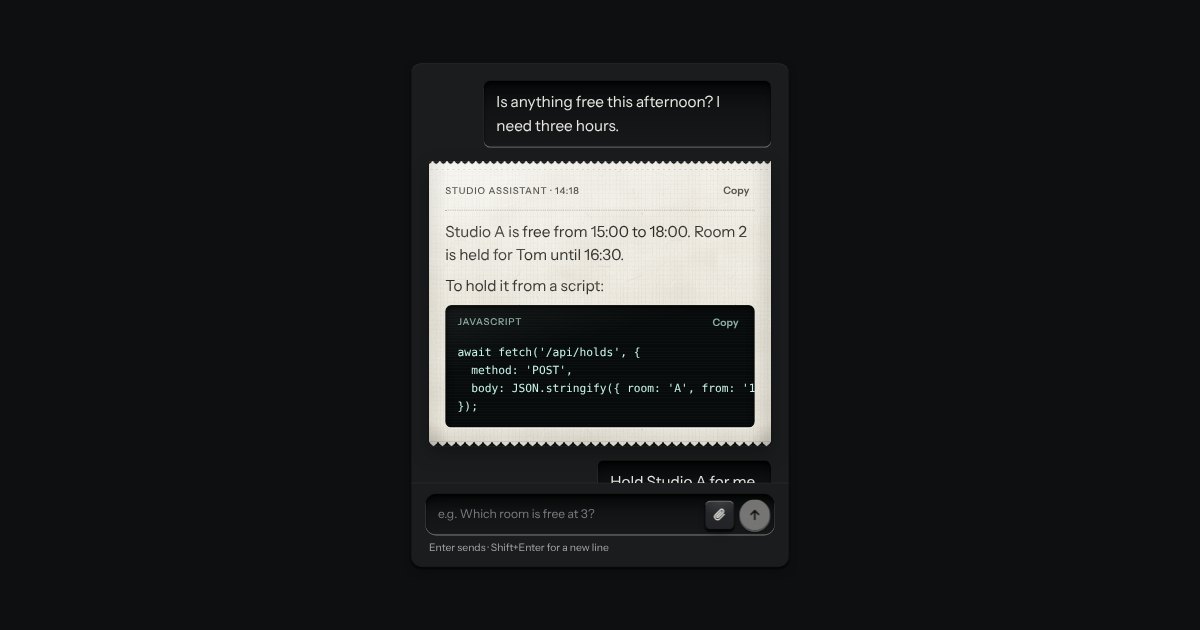
Chat
An AI chat as a teleprinter, with restraint: what you type sits in a recess; the answer prints on a perforated slip with an amber lamp at the print head; code comes up on display glass. Composer with attachments and a send key that becomes Stop.
Saving… Saved 2 min agoOffline
Sync status
A small legend that says whether your work is safe: Saving, Saved or Offline, with a lamp that matches (amber and blinking while it saves, green when it has, red when it cannot). The words are the state and the lamp only agrees with them. It is a polite status region, so changing its words is what a screen reader hears.
AO%22%2F%3E%3Cpath%20d%3D%22M32%2032%2058%2050a31%2031%200%200%201-16%2012z%22%20fill%3D%22%23fff%22%20opacity%3D%22.07%22%20filter%3D%22url(%23s)%22%2F%3E%3Ccircle%20cx%3D%2232%22%20cy%3D%2232%22%20r%3D%2210.5%22%20fill%3D%22%23d8d7d2%22%2F%3E%3Ccircle%20cx%3D%2232%22%20cy%3D%2232%22%20r%3D%2210.5%22%20fill%3D%22none%22%20stroke%3D%22%23000%22%20stroke-opacity%3D%22.25%22%2F%3E%3Cpath%20d%3D%22M24%2029.5h16M25.5%2034.5h13%22%20stroke%3D%22%23000%22%20stroke-opacity%3D%22.35%22%20stroke-width%3D%221.2%22%2F%3E%3Ccircle%20cx%3D%2232%22%20cy%3D%2232%22%20r%3D%221.3%22%20fill%3D%22%231a1a1b%22%2F%3E%3Crect%20width%3D%2264%22%20height%3D%2264%22%20filter%3D%22url(%23g)%22%2F%3E%3C%2Fsvg%3E) TRMH
TRMH%22%2F%3E%3Ccircle%20cx%3D%2235%22%20cy%3D%2233%22%20r%3D%2221%22%20fill%3D%22%23000%22%20opacity%3D%22.35%22%20filter%3D%22url(%23c)%22%2F%3E%3Ccircle%20cx%3D%2235%22%20cy%3D%2233%22%20r%3D%2223%22%20fill%3D%22none%22%20stroke%3D%22%23fff%22%20stroke-opacity%3D%22.08%22%20stroke-width%3D%223%22%20filter%3D%22url(%23s)%22%2F%3E%3Crect%20width%3D%2264%22%20height%3D%2264%22%20filter%3D%22url(%23g)%22%2F%3E%3C%2Fsvg%3E) +4
+4
TRMH+4Avatar
A person’s mark, struck like a coin: initials stamped into the field, or a photo set under the rim, with a status lamp mounted at five o’clock. Stacks into a group with a count.