Key
Every button, and every link that acts like one: a cap on a skirt that drops below the plate when pressed.
Kit part · Buttons
A key that copies a value and says so. Its lamp sits dark in the cap; when the text is on the clipboard the lamp lights, winks once, and the legend says Copied before it goes back to Copy. If the browser refuses the clipboard, the text is selected for the keyboard and the lamp lights amber.
Seats open in 11 days. Want one email that morning?
git clone tactileBoth finishes, side by side. Hover, pressed and focus are forced with .is-hover, .is-down and .is-focus; checked and disabled are real.
Aluminium
| Part | Rest | Hover | Pressing | Focus | Copied | Selected |
|---|---|---|---|---|---|---|
| Key |
Graphite
| Part | Rest | Hover | Pressing | Focus | Copied | Selected |
|---|---|---|---|---|---|---|
| Key |
| Name | Kind | Values | What it does |
|---|---|---|---|
| <button class="tui-key tui-copy-key"> | element | with data-copy-value or data-copy-from | The key. Empty, it is given its lamp and its legend by the script. |
| data-copy-value | attribute | the text itself | The value to copy. |
| data-copy-from | attribute | a selector, such as #cmd | An element that holds the value: an input or textarea by its value, anything else by its text. It is also what is selected if the clipboard refuses. |
| aria-label | attribute | on the key | Says what is copied: “Copy install command”. Start it with the visible word. |
| .tui-copy-key__legend | class | inside the key | The word on the key: Copy, then Copied or Selected for a moment. |
| .tui-copy-key__status | class | after the key | A polite status line, added by the script, that says aloud what happened. |
| tui-copy | event | detail { ok, text } | Bubbles from the key once the clipboard has answered; ok is false if the text was only selected. |
| copyFromKey(key) | function | a key | Does what a press does and resolves to whether the clipboard took the text. |
| copyKeyView(state, legend) · copyText(attrs, read) | function | pure | The legend, lamp and spoken words for each stage; the text a key points at. |
<!-- A value in the key -->
<button class="tui-key tui-copy-key" type="button" data-copy-value="npm install @northwind/cli" aria-label="Copy install command"></button>

<!-- Or the text of an element on the page, which is also what gets selected if the clipboard refuses -->
<code id="cmd">pnpm add @northwind/cli</code>
<button class="tui-key tui-copy-key" type="button" data-copy-from="#cmd" aria-label="Copy the command"></button>

<!-- Dressed by the script; this is what it leaves -->
<button class="tui-key tui-copy-key" type="button" data-copy-value="tok_8c1e" aria-label="Copy token">
  <span class="tui-lamp" aria-hidden="true"></span><span class="tui-copy-key__legend">Copy</span>
</button>
<span class="tui-copy-key__status" role="status"></span>
import { copyFromKey } from '/kit/kit.mjs';
document.addEventListener('tui-copy', (e) => {
if (!e.detail.ok) hint('Press Ctrl+C or Cmd+C to take the selected text');
});
await copyFromKey(document.querySelector('#token-key')); // true if the clipboard took itNeeds kit.css and kit.mjs. How to install the kit.
<button> named “Copy install command”, with the visible word first in the name so voice control can say it.It is the kit’s key with the kit’s lamp set in the cap, dark at rest. Nothing is drawn for the copied stage that the lamp does not already know how to draw: a lit lamp, green for done and amber for a question. One listener on the page answers every key that carries data-copy-value. It asks the clipboard first, then tries the old way from a hidden field, and only when both refuse does it select the text for the person to take. The key’s width is held between Copy and Copied so a toolbar does not shift.
Copy a command, a token or an address with one press, hear that it worked, and keep working when the clipboard says no.
5 rules in this file, with the foundations they rest on and the anti-patterns that break them. Full rules ship in the brain with the Pass.
Every button, and every link that acts like one: a cap on a skirt that drops below the plate when pressed.
One key that latches below the plate and stays there. It is the kit’s own key with one state to keep, down or up, so it is the way to say mute, pin, bold or armed without the weight of a switch. A lamp in the cap may light while it is down.
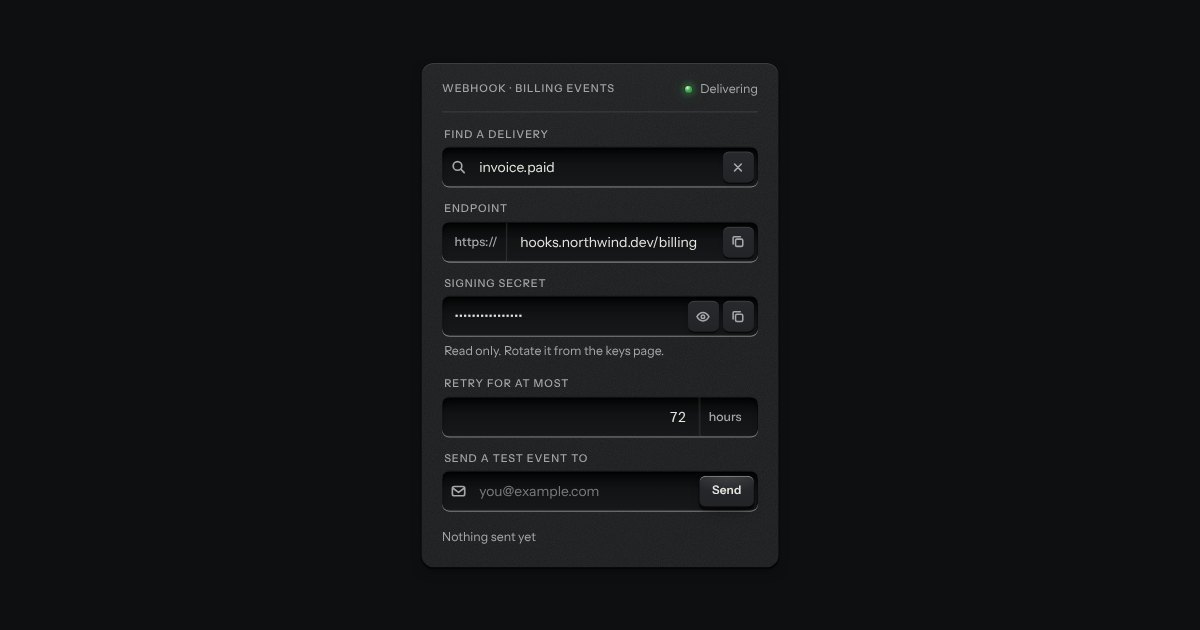
One recess that holds a field and everything that belongs to it. Words that are part of the value but are not typed, such as https:// or a currency, are printed on the floor of the well behind an engraved line; a glyph sits at the start; small keys sit at the end to clear the text, copy it, or show a password.
A confirmation after an action: a small plate with a lamp and one factual sentence, read out politely, gone in 3.6 seconds.